Introduction
WordPress powers 43.5% of all websites on the internet — over 532 million sites globally. Yet the average WordPress site still loads in 2.5 seconds on desktop and a painful 8.6 seconds on mobile. In 2026, that's not just a bad user experience — it's a business-killing mistake.
Google's Core Web Vitals are now hard-wired into its ranking algorithm. A slow website ranks lower, bounces more visitors, and converts fewer leads. Studies show a single 1-second delay reduces conversions by 7%, and 53% of mobile users abandon a page that takes more than 3 seconds to load. That's revenue walking out the door — silently, every single day.
The good news: building a fast WordPress website in 2026 is entirely achievable without advanced server knowledge. This complete guide walks you through every layer of speed optimization — from hosting choice to image formats to caching — in a clear, actionable sequence that works for beginners and developers alike.
Why WordPress Speed Matters More Than Ever in 2026
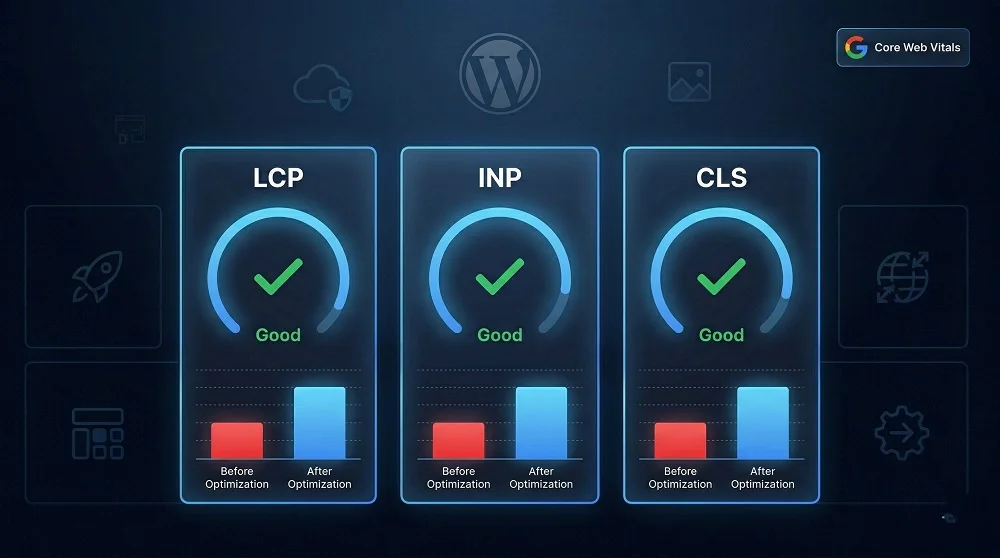
Speed is no longer just a performance metric — it's a business metric. Google's ranking systems in 2026 evaluate three specific signals called Core Web Vitals, and each one directly measures how fast and stable your site feels to a real user.
LCP
Largest Contentful Paint
Measures loading speed. Target: under 2.5 seconds. Tracks how fast your hero image or main heading appears.
INP
Interaction to Next Paint
Measures responsiveness. Target: under 200ms. How fast the page reacts to clicks, taps, and keystrokes.
CLS
Cumulative Layout Shift
Measures visual stability. Target: under 0.1. Tracks unexpected layout shifts that frustrate users while reading.
Miss these targets and you don't just lose rankings — you lose conversions. Sites that load in 1 second convert 3x more than sites that load in 5 seconds. The performance gap between fast and slow sites translates directly to revenue.
Step-by-Step: How to Build a Fast WordPress Website
Start With Fast, Managed WordPress Hosting
Hosting is the single most impactful factor in your WordPress site's speed — and the one most beginners get wrong. The difference between cheap shared hosting and quality managed WordPress hosting can be 500–1500ms on every single page load. That's not something you can optimize away with plugins.
For 2026, the best-performing hosting options for WordPress are managed WordPress hosts like Kinsta, WP Engine, and Cloudways. These providers offer PHP 8.3+, built-in server-level caching, Redis object caching, HTTP/3, and global CDN integration out of the box. The cost difference between a ₹300/month shared host and a ₹2000/month managed host is trivial compared to the speed and SEO gains you'll receive.
Pro Tip
Check your server's PHP version in WordPress Dashboard → Tools → Site Health → Info → Server. Running PHP 8.3+ is essential. PHP 7.4 is end-of-life and significantly slower.
Choose a Lightweight, Speed-Optimized Theme
Your theme is the second biggest performance decision you'll make. Multipurpose themes like Avada, Divi, or TheGym load dozens of CSS files, register scripts you'll never use, and add bloat on every single page load — even pages that don't use their features.
For a fast WordPress site in 2026, choose a lightweight base theme: GeneratePress, Astra, or Kadence are the top performers. All three load in under 50KB, score consistently high on PageSpeed Insights out of the box, and are fully compatible with the major page builders if you need them. Start lean — you can always add features, but you can't easily remove bloat baked into a heavy theme.
Install a Caching Plugin — It's the Most Impactful Single Change
Without caching, every visitor triggers WordPress to execute PHP code, query the database, assemble the page HTML, and return it — a process that takes hundreds of milliseconds at minimum. With page caching enabled, WordPress builds the page once, saves it as static HTML, and serves that pre-built file to everyone. The server reads and sends a file instead of executing PHP. We're talking single-digit milliseconds.
WP Rocket (₹5,000/year) is the gold standard — it applies 80% of optimizations automatically on activation with zero configuration needed. LiteSpeed Cache (free) is the best free option if your host runs LiteSpeed servers. W3 Total Cache (free) is a powerful alternative for developers who want granular control over every caching layer.
Caching Plugin Comparison
WP Rocket
Best overall. Easiest setup.
LiteSpeed Cache
Best free. LiteSpeed hosts only.
W3 Total Cache
Most control. Complex setup.
Optimize Every Image — They're 41% of Your Page Weight
Images account for 41% of the total page weight on the average website. They are almost always the largest, most impactful thing to optimize. In 2026, three changes make the biggest difference: converting to WebP or AVIF formats, compressing images before uploading, and enabling lazy loading so off-screen images only load when the user scrolls to them.
Use Imagify or ShortPixel to automatically compress and convert images on upload. Both plugins handle WebP conversion and bulk optimization of your existing media library. Also ensure you're serving responsive images using the srcset attribute so mobile visitors get appropriately sized images instead of a 2000px desktop image shrunk down by CSS.
Use a CDN to Deliver Content From Servers Near Your Visitors
A Content Delivery Network (CDN) stores copies of your static files — images, CSS, JavaScript, fonts — on servers distributed across the globe. When a visitor loads your site, they receive assets from the nearest server location instead of your origin server. A CDN can improve WordPress load times by up to 72% for visitors far from your primary hosting location.
Cloudflare is the most widely used option with a generous free plan that includes performance acceleration, DDoS protection, and smart caching. BunnyCDN is an excellent affordable alternative with some of the fastest global delivery speeds available. For most WordPress sites, enabling Cloudflare's free plan alone can produce a measurable, immediate improvement in PageSpeed scores.
Minify CSS & JavaScript and Reduce HTTP Requests
Every CSS file, JavaScript file, and font your page loads is a separate HTTP request — each adding latency to your load time. Minification strips whitespace and comments from these files without affecting functionality, reducing their size. Combining files reduces the total number of requests the browser has to make.
WP Rocket handles minification and file combination automatically. If you're using a free caching plugin, Autoptimize is a dedicated, free plugin that handles CSS and JS minification and concatenation effectively. Be sure to test thoroughly after enabling these features — combining certain JS files can occasionally break functionality on complex sites.
Quick Wins Checklist
✓ Enable GZIP / Brotli compression on server · ✓ Defer non-critical JavaScript · ✓ Remove unused CSS · ✓ Preload key fonts · ✓ Eliminate render-blocking resources
Audit and Reduce Your Plugins
Every active plugin adds PHP execution time and often enqueues CSS and JavaScript files on pages that don't need them. A WordPress site with 40+ plugins isn't unusual — but it's almost always a performance liability. The rule is simple: if a plugin isn't actively contributing to your site's goals, deactivate and delete it.
Use Query Monitor to identify which plugins are adding the most database queries and execution time. Use Asset CleanUp to disable specific plugin scripts on pages where they're not needed. Regularly audit your active plugins — aim to keep the list under 15–20 essential, well-maintained plugins from reputable developers.
Optimize Your WordPress Database Regularly
Over time, your WordPress database accumulates clutter: post revisions, auto-drafts, spam comments, transients, and orphaned metadata from deleted plugins. This bloat slows down database queries — meaning every page load takes longer than it should.
Use WP-Optimize to automatically clean and optimize your database on a schedule. Limit post revisions by adding define('WP_POST_REVISIONS', 5); to your wp-config.php file. For high-traffic or complex sites, enable Redis object caching to cache database query results in memory — eliminating repeated database lookups for the same data.
Keep WordPress, Themes, and Plugins Updated
WordPress 6.8 introduced 24 dedicated performance improvements. Theme and plugin updates frequently include optimizations, security patches, and compatibility improvements with newer PHP versions. Running outdated software doesn't just expose you to security vulnerabilities — it actively makes your site slower.
Set up a staging environment to test updates before applying them to your live site. Most managed WordPress hosts provide one-click staging. Update your live site during low-traffic hours, and always take a backup immediately before any major update.
Measure, Test, and Keep Improving
WordPress speed optimization is not a one-time task — it's an ongoing process. Your site changes as you add content, install plugins, and update themes. Performance needs to be monitored continuously and tested after every significant change.
Use Google PageSpeed Insights for Core Web Vitals scores, GTmetrix for a detailed waterfall analysis of every resource your page loads, and Google Search Console to monitor Core Web Vitals performance across your entire site over time. Aim for a PageSpeed score of 90+ on both desktop and mobile — and always prioritize mobile since Google uses mobile-first indexing.

The Complete WordPress Speed Optimization Checklist
Use this checklist to audit your current WordPress site or build a new one from the ground up the right way.
Hosting & Server
Managed WordPress hosting · PHP 8.3+ · HTTP/3 enabled · Redis object cache · Server in correct geographic region
Theme & Plugins
Lightweight theme (GeneratePress/Astra) · Under 20 active plugins · No unnecessary sliders or heavy page builders
Caching
Page caching enabled (WP Rocket / LiteSpeed Cache) · Browser caching configured · GZIP or Brotli compression active
Images
WebP/AVIF format · Compressed before upload · Lazy loading enabled · Responsive srcset configured · No unneeded images
CSS & JavaScript
CSS and JS minified · Render-blocking scripts deferred · Unused CSS removed · Non-critical scripts loaded async
CDN & Database
Cloudflare or BunnyCDN active · Database cleaned monthly · Post revisions limited in wp-config.php · Transients cleared
What Results Can You Expect?
Implementing these optimizations systematically produces measurable, significant results. Here's what a well-optimized WordPress site typically achieves compared to an unoptimized baseline.
Typical Results After Full WordPress Speed Optimization:
< 1.5s
Load time achievable on a well-optimized managed WordPress host with caching
90+
Google PageSpeed score on both desktop and mobile after full optimization
3x
More conversions from a 1-second site vs a 5-second site — proven by Portent
Conclusion
Building a fast WordPress website in 2026 is not a single big fix — it's a sequence of smaller, compounding improvements. Start with hosting and TTFB. Then move to your theme, caching, images, and JavaScript. Each step on its own delivers gains; together, they transform a sluggish site into a high-performing, SEO-competitive, conversion-optimized platform.
The sites that win on Google and convert the most visitors are not necessarily the most beautiful — they're the ones built by people who understand performance, measure it consistently, and keep improving it over time. Speed is a competitive advantage that compounds every month you maintain it.
Fast websites don't happen by accident. They're built with intention, tested with data, and maintained with discipline.
Need a faster website?
Let's Build Your High-Performance WordPress Website
Get a lightning-fast, SEO-optimized WordPress website designed for speed, security, and conversions. Perfect for businesses that want better rankings, faster load times, and a smooth user experience.
Start Your WordPress Project →